Boring Boxes, Real Risk: Auditing the Devices Nobody Owns
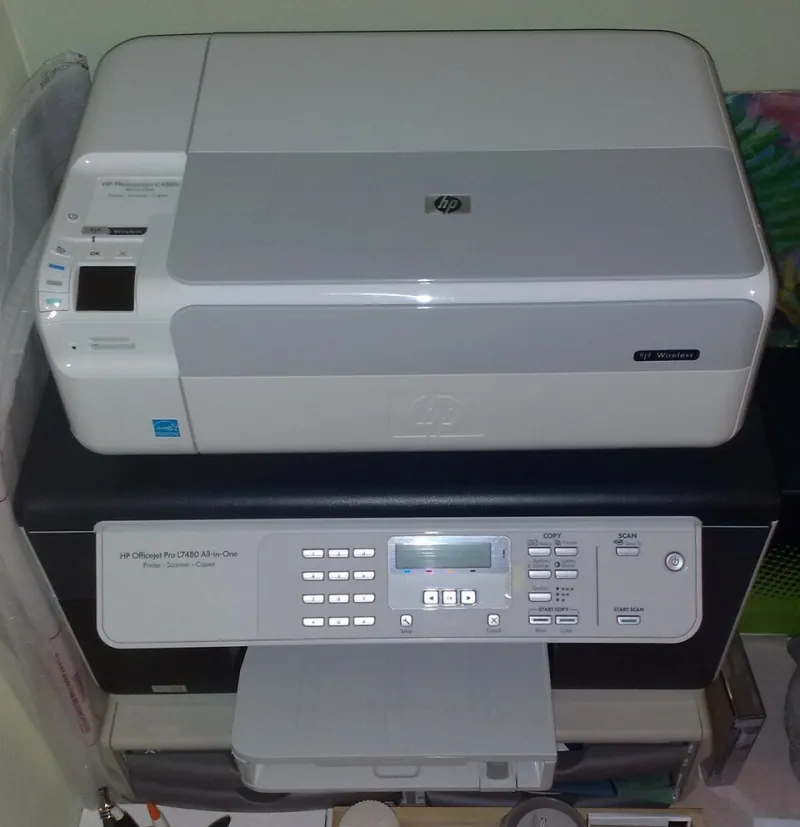
Photo: Fhuity, CC BY-SA 4.0, via Wikimedia Commons
The device everyone trusts and nobody owns
Most UK SMEs have spent the past three years hardening the obvious things. Laptops are encrypted, email sits behind multi-factor authentication, and the finance system is watched closely. Then, on the reception desk, sits a multifunction printer whose administrator password has never been changed, which holds a directory credential for scan-to-email, and which shares a flat network with the very finance system everyone is protecting.
The awkward truth is that printers, scanners, network-attached storage, meeting-room displays, door controllers and label printers are all computers. They run operating systems, accept inbound connections and store data. The difference is that nobody gives them a patching window, nobody assigns them an owner, and nobody notices when they appear in a supplier's breach notification. They are unmanaged endpoints wearing office furniture as camouflage.
What follows is not an enterprise programme. It is a checklist one person can complete, room by room, over a few hours, and then repeat each quarter.
Why an MFP is a door rather than a box
A modern multifunction device can hold an address book of every contact in the business, a bind credential for the directory, credentials for a file share or FTP destination, a copy of every document scanned to that share, and an embedded web server that answers to a browser on the same subnet. Some models still ship with a remote shell enabled and a default password printed in a publicly available manual.
None of this is exotic. It is simply unexamined.
Step one: walk the building with a clipboard
The audit begins with a physical inventory, because most asset registers miss precisely the devices that matter here. Assign one person and ninety minutes. Visit reception, each meeting room, the print or copy room, the comms cupboard, the finance office and any warehouse or workshop space.
For every device, record six things: make and model, serial number, firmware version and date, IP address, the network segment it sits on, and the name of a person who would notice if it vanished. Photograph the asset label. If a device has no owner, that is the finding, not a gap in the form.
Step two: replace the password printed in the manual
Default credentials remain the single most common weakness on office peripherals, and the fix costs nothing. Change the administrator password on every device, store it in the password manager rather than on a label under the paper tray, and disable the accounts and protocols nobody uses. Telnet, unencrypted FTP, management interfaces exposed beyond the local segment and SNMP read strings left at public should all be switched off unless a specific, documented requirement says otherwise.
Restrict access to the device's web interface so that it answers only to the IT management segment, not to every laptop in the building.
Step three: give firmware a calendar entry
Printer and NAS firmware receives security updates far more often than most finance directors would guess. Rather than relying on a supplier to mention it, add every device to the same monthly patch review that covers laptops and servers. Check the vendor's security advisory page quarterly, record the version applied, and treat a device that can no longer be updated as an end-of-life item with a replacement date attached.
Step four: constrain scan-to-email
Scan-to-email is convenient and quietly dangerous. Route it through an authenticated SMTP relay rather than allowing devices to send directly, so that the filtering and logging applied to staff email also applies to the scanner. Limit outbound recipients to domains the business genuinely deals with, disable scan-to-USB where it is unnecessary, and set a retention rule so scanned documents do not accumulate indefinitely on a device's internal drive or in a shared folder that nobody reviews.
Step five: put the boring devices on their own segment
Segmentation is the highest-value control in this list and the one most often skipped. Place printers, displays, cameras and storage on a dedicated VLAN, then permit only the specific protocols staff devices need — printing, scanning, management — in one direction. Nothing on the device segment should be able to initiate a connection to a server. Guest Wi-Fi belongs elsewhere again.
For an SME without a full-time network engineer, this is a half-day job for a competent managed IT provider, and it removes an entire class of lateral movement.
Step six: keep a log that somebody reads
Enable the device audit log and forward it to a central collector, or at minimum review administrator logins and configuration changes weekly. The goal is not surveillance; it is the ability to answer a simple question after an incident — was this device reconfigured, and when?
Step seven: retire it properly
When a device leaves the building, its storage leaves with it. Wipe or physically destroy the drive, obtain a certificate of disposal, remove the device from DNS, DHCP reservations, the directory and any email relay allowlists, and close it in the asset register. An old printer in a skip is a data breach with a plug on it.
What good looks like after one quarter
Report four numbers to the board: the proportion of devices with unique administrator credentials, the proportion running firmware less than two versions behind, the proportion isolated on a segmented network, and the number of devices without a named owner. Track the same four next quarter.
That is a security result a finance director can see, delivered without an enterprise budget and without pretending the printer is interesting. It is not interesting. It is simply connected — and that is enough.